Showing posts with label keywords. Show all posts
Showing posts with label keywords. Show all posts
Wednesday, 19 November 2014
Web presence is essential to all businesses. To establish a web presence, you'll need a website/blog, and to be stable and stay online it needs a reliable web hosting service. So what is reliable? Does "paid hosting" means better, more reliable
service? Not necessarily true. A lot of times, free web hosting and paid hosting offers the same security, network bandwidth and port speed. The only difference is the hosting features included. These features include additional disk storage, data transfer, more scripting support, more email accounts, etc. For a business opening a new website, or for any regular website, the disk storage and data transfer offered by a free web hosting service would be sufficient. It takes time to grow a website and accumulate enough visitors to max out the storage and/or data transfer limits of a free web hosting package. You can always upgrade your service from the free web hosting to paid hosting when the time comes. Most small businesses do not need more than 5 email accounts. The more accounts you have just means the more time you have to spend managing them. Many free web hosting providers offer email aliases (or email forwarders) that allows you to create the illusion of having many different email addresses but in fact all emails to these aliases are redirected and managed by one account. Unless you are planning on using applications that require advanced scripting support (ie. a content management system, an e-commerce shopping cart, etc.), your web files will simply be of HTML and image files. HTML and image files do not require advanced scripting support - any free web hosting services will do. In conclusion, unless your website require the specific features offered by the paid hosting plans, free web hosting services might be all you need and especially if you are aiming to save on money without compromising on the performance. Getting free hosting is easy with some links I'm going to post here... https://googiehost.com/ https://www.x10 hosting.com/ https:// www.000webhost.com But the free web hosting posted above are not that perfect as you want them to be because of unstable server, low data storage and others. And if you are Willing to get a premium web hosting as cheap as paying nothing Then you can opted in for DOMAINKING at http://clients.domainking.ng/index.php You can start with anyone here especially newbie... Like perhaps Post a comment if you find this piece useful.. *cheers* :)
service? Not necessarily true. A lot of times, free web hosting and paid hosting offers the same security, network bandwidth and port speed. The only difference is the hosting features included. These features include additional disk storage, data transfer, more scripting support, more email accounts, etc. For a business opening a new website, or for any regular website, the disk storage and data transfer offered by a free web hosting service would be sufficient. It takes time to grow a website and accumulate enough visitors to max out the storage and/or data transfer limits of a free web hosting package. You can always upgrade your service from the free web hosting to paid hosting when the time comes. Most small businesses do not need more than 5 email accounts. The more accounts you have just means the more time you have to spend managing them. Many free web hosting providers offer email aliases (or email forwarders) that allows you to create the illusion of having many different email addresses but in fact all emails to these aliases are redirected and managed by one account. Unless you are planning on using applications that require advanced scripting support (ie. a content management system, an e-commerce shopping cart, etc.), your web files will simply be of HTML and image files. HTML and image files do not require advanced scripting support - any free web hosting services will do. In conclusion, unless your website require the specific features offered by the paid hosting plans, free web hosting services might be all you need and especially if you are aiming to save on money without compromising on the performance. Getting free hosting is easy with some links I'm going to post here... https://googiehost.com/ https://www.x10 hosting.com/ https:// www.000webhost.com But the free web hosting posted above are not that perfect as you want them to be because of unstable server, low data storage and others. And if you are Willing to get a premium web hosting as cheap as paying nothing Then you can opted in for DOMAINKING at http://clients.domainking.ng/index.php You can start with anyone here especially newbie... Like perhaps Post a comment if you find this piece useful.. *cheers* :)
Saturday, 15 November 2014
If you are using Google adsense in your blog as
monetizing method, then you must be aware of high
paying keywords. Every keyword is not paying the
same amount for each clicks. Therefor, it’s
advisable to find and insert high paying keywords in
your blog or posts. Let me show in this post how to
find high paying keywords for adsense.
The simple and free tool we can use for this
purpose is
, Google keyword tool. It’s a free product
for adsense users. Google keyword tool is not
designed for publishers like us, it’s designed for
advertisers who are looking to advertise through
Google adwords. But, as publishers and bloggers
we can utilize this product to find the high paying
keyword for adsense.
Ok, lets go with an example.
If you are planning to write a post about
“Webhosting”, go to Google keyword tools and
enter the keyword phrase.
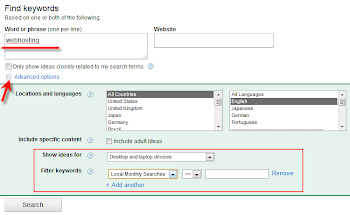
Some filter options are available under Advanced options.
Once you press the Search button, it will list out the keywords related to search term. The fields are
easy to understand.
If you still can’t find the very suitable keyword for ‘Webhosting’, this can be filtered by Match Types in left side.
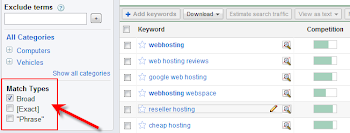
Remove the ‘Board’ type and select either Exact or
Phrase .
‘Exact’ will bring the more relevant keyword for
your search term.
“Phrase” will bring the same search term text in
keywords.
But, we are here to get the high paying keyword
related to ‘Webhosting’ , so first do not not change any filter types under Match Types.
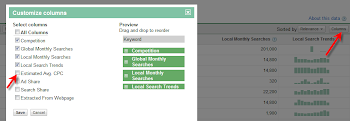
The first result screen in Google keyword tool doesn’t show the Estimated Avg CPC ( which decides the value of keyword), we have to enable
this column by doing following steps.
Click on columns in right side of menu bar and select the Estimated Avg CPC.
What is Estimated Avg CPC?
As I said earlier, this tool is for advertisers. If I’m a
advertiser and want to advertise my product or
service through Google adwords, then I have to
select some keyword for each ad slots.
For example if my main keyword for this ad campaign is ‘webhosting’, then I have to bid (pay) more than Estimated Avg CPC for ‘webhosting’ keyword for a click to beat the competitors. So, my ads will be displayed in Google’s first search result (Search results related to webhosting), top blogs and blog posts related to ‘webhosting’.
So, obviously high Estimated Avg CPC means, high pay out for publishers also if we get the correct ads.
Now click on Estimated Avg CPC column to sort the filed.
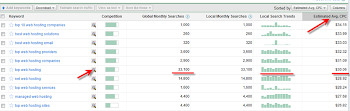
Here you have to understand something clearly and
select the correct keyword.
Competition
Again this is not for us, this means the competition
between advertisers, there are more advertisers
bidding and advertising on this keyword.
If you want to find the competition for specific
keyword as a blogger, then just simply type this
keyword in Google and see the number of search
results found.
The arrow mark I showed next to Competition
column will give more ideas on this keyword about
trend and history from Google Insights. It’s another
handy tool for bloggers to find out the good keyword
and niche for a blog or post.
Global and Local Searches
This should be considered too. If you target only
high paying keyword but no one is searching that,
then its pointless and you can’t make any money
from adsense.
You should be very smart to select the correct high
paying keyword. If you select the high searched
keyword, then it will have more competition. Getting
in to Google’s first page for thisj keyword is not at
all an easy task.
In this example, I would prefer to write about ‘ Top
web hosting’ . Its having high paying keyword with good search history.
But unfortunately, its having more competition with 140,000,000 results (as of today). so I don’t think I can beat them.

In this case, I follow my own way to utilize this high paying keyword to monetize my blog posts with adsense.
I will write that technique in coming days.
Feel free to drop your comments and suggestion about these steps.
Sources: www.dailyblogmoney.com/how-to-find-high-paying-keyword-for-adsense
monetizing method, then you must be aware of high
paying keywords. Every keyword is not paying the
same amount for each clicks. Therefor, it’s
advisable to find and insert high paying keywords in
your blog or posts. Let me show in this post how to
find high paying keywords for adsense.
The simple and free tool we can use for this
purpose is
, Google keyword tool. It’s a free product
for adsense users. Google keyword tool is not
designed for publishers like us, it’s designed for
advertisers who are looking to advertise through
Google adwords. But, as publishers and bloggers
we can utilize this product to find the high paying
keyword for adsense.
Ok, lets go with an example.
If you are planning to write a post about
“Webhosting”, go to Google keyword tools and
enter the keyword phrase.

Some filter options are available under Advanced options.
Once you press the Search button, it will list out the keywords related to search term. The fields are
easy to understand.
If you still can’t find the very suitable keyword for ‘Webhosting’, this can be filtered by Match Types in left side.

Remove the ‘Board’ type and select either Exact or
Phrase .
‘Exact’ will bring the more relevant keyword for
your search term.
“Phrase” will bring the same search term text in
keywords.
But, we are here to get the high paying keyword
related to ‘Webhosting’ , so first do not not change any filter types under Match Types.
The first result screen in Google keyword tool doesn’t show the Estimated Avg CPC ( which decides the value of keyword), we have to enable
this column by doing following steps.
Click on columns in right side of menu bar and select the Estimated Avg CPC.

What is Estimated Avg CPC?
As I said earlier, this tool is for advertisers. If I’m a
advertiser and want to advertise my product or
service through Google adwords, then I have to
select some keyword for each ad slots.
For example if my main keyword for this ad campaign is ‘webhosting’, then I have to bid (pay) more than Estimated Avg CPC for ‘webhosting’ keyword for a click to beat the competitors. So, my ads will be displayed in Google’s first search result (Search results related to webhosting), top blogs and blog posts related to ‘webhosting’.
So, obviously high Estimated Avg CPC means, high pay out for publishers also if we get the correct ads.
Now click on Estimated Avg CPC column to sort the filed.

Here you have to understand something clearly and
select the correct keyword.
Competition
Again this is not for us, this means the competition
between advertisers, there are more advertisers
bidding and advertising on this keyword.
If you want to find the competition for specific
keyword as a blogger, then just simply type this
keyword in Google and see the number of search
results found.
The arrow mark I showed next to Competition
column will give more ideas on this keyword about
trend and history from Google Insights. It’s another
handy tool for bloggers to find out the good keyword
and niche for a blog or post.
Global and Local Searches
This should be considered too. If you target only
high paying keyword but no one is searching that,
then its pointless and you can’t make any money
from adsense.
You should be very smart to select the correct high
paying keyword. If you select the high searched
keyword, then it will have more competition. Getting
in to Google’s first page for thisj keyword is not at
all an easy task.
In this example, I would prefer to write about ‘ Top
web hosting’ . Its having high paying keyword with good search history.
But unfortunately, its having more competition with 140,000,000 results (as of today). so I don’t think I can beat them.

In this case, I follow my own way to utilize this high paying keyword to monetize my blog posts with adsense.
I will write that technique in coming days.
Feel free to drop your comments and suggestion about these steps.
Sources: www.dailyblogmoney.com/how-to-find-high-paying-keyword-for-adsense
Search Engine Optimization companies are making a fortune by doing the menial work that is overlooked by many designers. It is ridiculously easy to do most of the work done by most SEO companies, all you have to do is create good habits.
There are 9 main points you should focus on:
• Keywords
• URL Text
There are 9 main points you should focus on:
• Keywords
• URL Text
• Description, Meta tags
• Title tags
• Image Names
• ALT tags
• Heading tags
• Content
• Hyperlinks
The focus of these 8 steps is to load your pages with as many "keywords" as possible. Keywords
Keywords are the most important aspect of good SEO, this is where you tell the Search Engines what
your site is about. Search Engines use an algorithm to determine the "Keyword Density" of your site, this
formula is: Total Words ÷ Keywords= Keyword Density
Use this formula on your competitors web site and see how they score, then aim to beat that score.
Choose keywords that best relate to the information, products or services that you are offering. For instance, if I am designing a site about "Web
Design", I want my site to include the words "Web Design" as many times as possible.
However, most people don't just search for just one word, they type phrases, so you should consider
the phrases that best suit your sites target market.
For example, if I am creating a site about "Web Design" in New Orleans, I would include "New Orleans web design" in my keywords. Another way
around this is to not separate my keywords with commas, just use spaces, and the Search Engines
will make the phrases for you. The most important thing to remember is that the content of each page
is different, so only use keywords pertaining to that page.
URL Text
When you name a new page you have the option to call it anything you could possibly think of, why not
se a keyword? After all, the URL address is the first things a search engine comes across when
indexing your pages. You have to remember content doesn't come easy to everyone, so you gotta slip in
your keywords when the process gives you an easy one.
Description Meta tags
These tags are dwindling in importance since Search Engines are now looking at content, but every little bit counts.
Optimize your meta tags to match your content, products, and services, and the Search Engines
that still look at meta data will reward your efforts.
Title Tags
Title tags are the tags that tell the Search Engine the title, or formal description of the document or
page. This is the word or phrase that is seen at the top of the browser window. The most important rule
about title tags is, don't put anything in the title tags but keywords. Once again this is an easy time to
slip in your keywords, so don't miss out.
Image Names
As I said before, content doesn't come easy to everyone, so slip in your keywords whenever possible, this applies to image names. If you are
saving a picture of a guy working on a computer for your web design web site, don't call it "some_dude.jpg", call it "web_site_design.jpg". The Search
engine will look at the code for the site and see the image pertains to the content of the site and this will be another relevant element on that particular page. You have to take the easy ones when you are given a chance.
ALT tags
Alt tags are keywords that you can attach to images, giving more weight to the image since Search Engines can't analyze the content of the
image itself. Here is a chance to slip in more keywords without writing great content, use it.
Heading tags
Heading tags are associated with the bold font that leads into a section of text. Like this:
Web Design
Web Design Inc. offers custom web site designs...
Your heading tags should only be keywords, and should be presented in the order that your Meta tags follow.
H1= first meta tag, H2= second meta tag...
Try to utilize all 6 heading tags on each page to ensure maximum page optimization.
Content
As every expert will tell you, "Content is King." Each web page should have at least 350 words on it, and
the more the better, but keep in mind the formula for keyword density. You don't want to fill a page with 1500 words of jibba-jabba and only 5 keywords in it. Some people get hung-up on how browsers
display text, and use images with text in them because they want a cool font, but browsers can't
read the text embedded in images, so this content ads no weight to the page in a Search Engines eyes.
Linkbaiting is the new trend among high ranking sites. Linkbaiting means writing quality content, or
w articles that other web sites can display on their pages as long as they give credit, and a link to your
site.
You don't have to be a vi or emac expert to write good web content, just be thoughtful of how you word things and incorporate your keywords.
Hyperlinks
Hyperlinks are text links to other pages on your site. The rules of SEO and hyperlinks are easy:
• Use hyperlinks so the Search Engine will have a text link to follow to the next page
• Don't use one word links, use long link phrases, preferably keyword phrases
• Use bullets, or some sort of small image that you can attach an ALT tag to, this will ad more importance to the link, and throw in a couple of free keywords for you.
Keep these 9 aspects in mid when designing a site, and you are sure to have a leg up on the competition..
As a a blogger, You wish to have have your own .com website..
LET'S GET STARTED
To build a websites you need a domain name, hosting(where your websites will be store) and software to build your websites in less than an hour...
1. The first thing your site will need is a name. That's easier said than done
these days. All the best words in the dictionary have either already been
bought and built by developers or they've been bought and offered by
speculators.
But that doesn't mean you can't create a good name and buy it for a song.
Putting two words together with a hyphen can work (like http://www.adsense-tools.com) and there are plenty of good names available if you're prepared to move outside the world of .coms into .net and .biz etc.
Your first stop should be http://www.NetworkSolutions.com. This is a nuts and bolts service that lets you hunt and buy names, order hosting plans and even submit your site to the search engines. When you're looking for a name, you can just toss in ten options and the site will tell you which (if any) are available. Find a good one, and you can either buy it there or pick it up at http://www.godaddy.com (they can be a bit cheaper). All in, buying a name
from one of these service won't cost you more than about $9 a year.
If you can't find a name you like and that hasn't already been grabbed, you
can take a look at sites like moderndomains.com and bestnames.net. These
are companies that buy domain names and sell them for a profit. There's a good chance you'll find some good names here but they can cost you anything from $50 to $50,000. Before you part with a penny, think about the advantage that a good name can bring and ask yourself if you can't get the extra traffic a cheaper way. Often, you can.
2. Your site is going to be stored on a hosting company's server. (You didn't want thousands of people dialing into your computer every hour, did you?)
Again, there are lots of different options available depending on how much you want to pay and what you need.
In general, you'll want to make sure that you have about 50 megabytes of
space (that's enough for 100 pages!), full statistics reporting and most
importantly, 24 hour service. If your site goes down, you'll be losing money
every hour it's offline. If there's a problem with the server, you want to make
sure it's fixed right away.
You get what you pay for with Web hosting from "free" services that will cost
you more than you save to $200 a month for dedicated servers. Twenty
bucks a month is a reasonable price to pay and GoDaddy.com and
NetworkSolutions.com both offer good programs.
3. Designing The Site
It used to be said that absolutely anyone could create a website. That was true: absolutely anyone who knew HTML. Today, you don't even need to know that. Programs like Microsoft's FrontPage or NVU (which is free; you can download it at www.nvu.com) let you create sites without you needing to know your tags from your tables. If you can use Word, you can create a website.
You can either have fun playing with the programs and designing the site
yourself or you can hire a professional designer to do it for you.
Freelance sites like www.elance.com and www.guru.com are good places to advertise. You can invite designers to give you quotes and pick the best
based on price and talent. Be sure to check feedback and portfolios though; a low bid is often low for a good reason.
LET'S GET STARTED
To build a websites you need a domain name, hosting(where your websites will be store) and software to build your websites in less than an hour...
1. The first thing your site will need is a name. That's easier said than done
these days. All the best words in the dictionary have either already been
bought and built by developers or they've been bought and offered by
speculators.
But that doesn't mean you can't create a good name and buy it for a song.
Putting two words together with a hyphen can work (like http://www.adsense-tools.com) and there are plenty of good names available if you're prepared to move outside the world of .coms into .net and .biz etc.
Your first stop should be http://www.NetworkSolutions.com. This is a nuts and bolts service that lets you hunt and buy names, order hosting plans and even submit your site to the search engines. When you're looking for a name, you can just toss in ten options and the site will tell you which (if any) are available. Find a good one, and you can either buy it there or pick it up at http://www.godaddy.com (they can be a bit cheaper). All in, buying a name
from one of these service won't cost you more than about $9 a year.
If you can't find a name you like and that hasn't already been grabbed, you
can take a look at sites like moderndomains.com and bestnames.net. These
are companies that buy domain names and sell them for a profit. There's a good chance you'll find some good names here but they can cost you anything from $50 to $50,000. Before you part with a penny, think about the advantage that a good name can bring and ask yourself if you can't get the extra traffic a cheaper way. Often, you can.
2. Your site is going to be stored on a hosting company's server. (You didn't want thousands of people dialing into your computer every hour, did you?)
Again, there are lots of different options available depending on how much you want to pay and what you need.
In general, you'll want to make sure that you have about 50 megabytes of
space (that's enough for 100 pages!), full statistics reporting and most
importantly, 24 hour service. If your site goes down, you'll be losing money
every hour it's offline. If there's a problem with the server, you want to make
sure it's fixed right away.
You get what you pay for with Web hosting from "free" services that will cost
you more than you save to $200 a month for dedicated servers. Twenty
bucks a month is a reasonable price to pay and GoDaddy.com and
NetworkSolutions.com both offer good programs.
3. Designing The Site
It used to be said that absolutely anyone could create a website. That was true: absolutely anyone who knew HTML. Today, you don't even need to know that. Programs like Microsoft's FrontPage or NVU (which is free; you can download it at www.nvu.com) let you create sites without you needing to know your tags from your tables. If you can use Word, you can create a website.
You can either have fun playing with the programs and designing the site
yourself or you can hire a professional designer to do it for you.
Freelance sites like www.elance.com and www.guru.com are good places to advertise. You can invite designers to give you quotes and pick the best
based on price and talent. Be sure to check feedback and portfolios though; a low bid is often low for a good reason.
Subscribe to:
Posts (Atom)
Popular Posts
-
Google Hacking - The Basics Maniac Hacking - The Basics • What exactly is Google Hacking? • Google Hacking involves using the Google search ...
-
543 Hacking / Hacking Exposed 6: Network Security Secrets & Solutions / McClure & Scambray / 161374-3 11 Web Hacking 11-ch11.indd 54...
-
Bulk SMS is Gradually Turning Out to be the Most Simplest & Easiest Way to Make Money doing a Stressless work while Seeking Admission or...
-
A common worry for site owners is that of duplicate content. This worry can develop over time as your site gets bigger you might begin to fo...
-
Now you can root your android device without PC, just use framaroot. This app including several exploits named as the heroes of the book ...
-
If you don't mind, you can buy me a beer or send me a gift because if not for my research and study we wouldn't have come across thi...
-
Hi there. This is my first serious “black hat hacking” post of credit cards hacking. Here will be explained all methods used to hack credit ...
-
A leading question raised by website content writers today is - "How do I write a copy that facilitates conversions?" More often t...
-
Internet is full of opportunities to make money online , and blogging is one of the smartest and rewarding way, to earn money. One big mis-...
-
M any business owners who want to market their business online have heard of the tremendous benefits of making use of SEO services ( search ...

